Raceband VTX Detector — 5.8 GHz Channel Scanner
Background
If you fly or drive radio controlled models with a video feed, you know the pain. Everyone’s video transmitter runs in the same 5.8 GHz Raceband, and there are only 8 channels to go around. Two people on the same channel and both feeds turn to garbage.
So every time I show up at the track, the first question is always the same: which channel is actually free right now? The usual way to find out is to just power up your transmitter and ask around, or watch someone else’s screen go fuzzy and realize you stepped on their channel. Not great.
I wanted a way to look at the whole band and just see what’s in use before I switch anything on.
What I built
A small Mac app that listens to the 5.8 GHz Raceband with a HackRF (a cheap-ish software defined radio) and tells me, per channel, whether it’s busy or free.
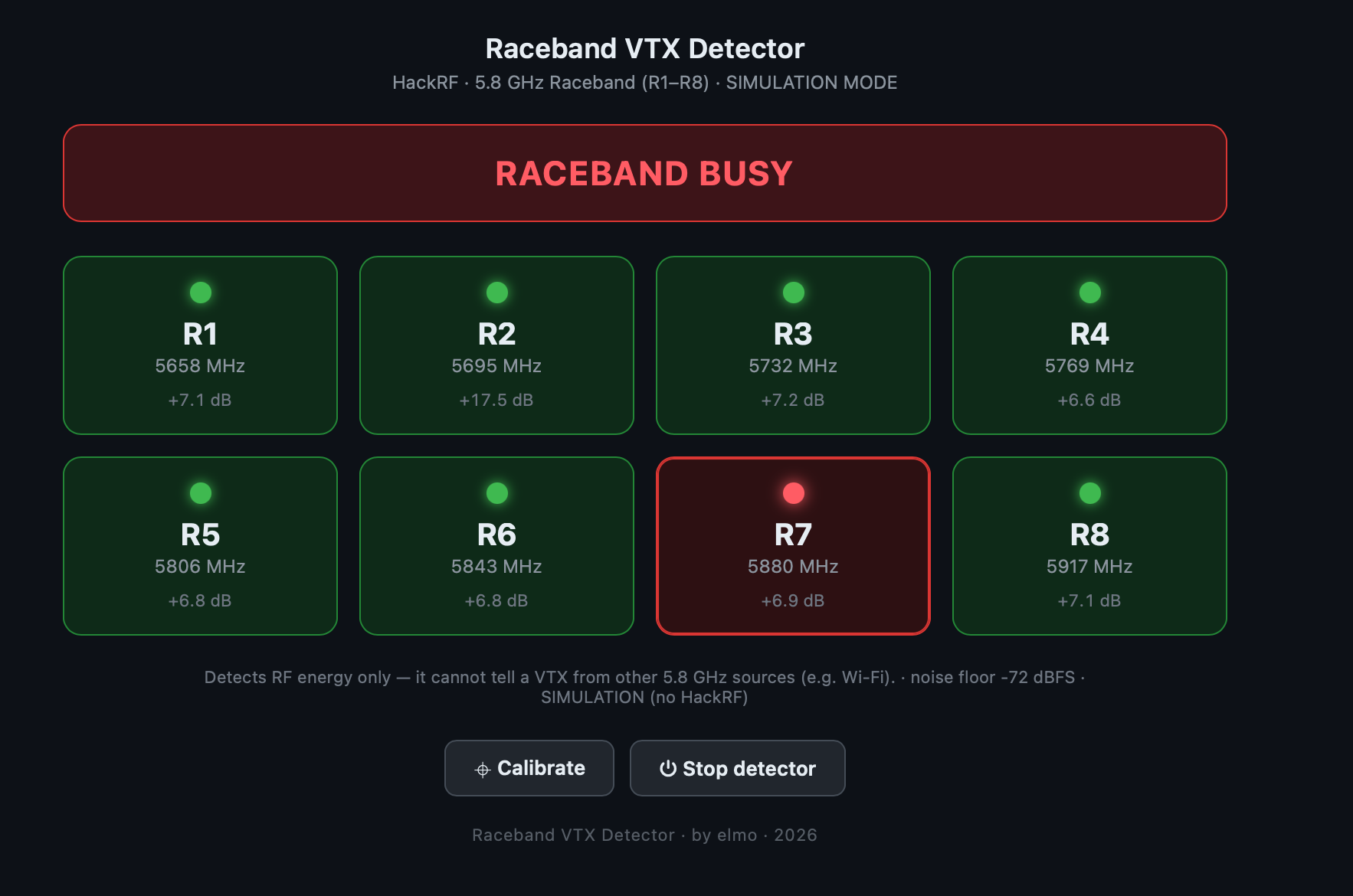
It scans all 8 Raceband channels (R1 through R8, 5658 to 5917 MHz) and shows a simple grid: green tile means the channel is clear, red means someone’s transmitting on it. There’s also a big banner at the top so you can tell at a glance whether the band is busy or clear without reading every tile.
Under the hood it’s pretty boring in a good way. The HackRF sweeps the band a few times a second, the app measures the signal strength around each channel’s frequency, and compares it to the background noise. If a channel is sitting way above the noise floor, something’s transmitting there.
The interesting part was getting it to not lie to me. My first version looked at a single sweep and flagged anything 12 dB above the noise as “busy” — and it lit up channels that were completely empty, because radio noise spikes all over the place. The fix was to average across a bunch of sweeps. A real transmitter sits there steadily; random noise doesn’t. Once I averaged, an actual video transmitter showed up about 38 dB above the floor while the noise stayed under 15 dB. Huge gap, easy call. I set the threshold right in the middle at 25 dB.
There’s also a calibrate button. The band isn’t perfectly quiet — there was a steady signal on one channel at my desk that turned out to be WiFi, not a transmitter. Calibrate takes a snapshot of whatever’s in the air when nothing’s flying and treats that as the baseline, so a noisy-but-harmless channel doesn’t keep crying wolf.
I packaged it up as a normal Mac app with its own icon, so I just double-click it. It opens in the browser, runs in the background, and there’s a stop button when I’m done. I also added a simulator mode so I can demo the thing or poke at the UI without dragging the radio out.
Outcome
It just works. I plug in the HackRF, double-click the app, and a dashboard pops up showing all 8 channels live. Anyone standing nearby can glance at the screen and immediately see which channels are taken and which are open — no powering things up to find out, no guesswork.
I tested it against my own transmitter: set it to a channel, the app lit up exactly that channel and nothing else. Switched channels, the red dot followed within about a second. And the real proof — when it flagged a channel busy, that was the same channel showing video in my goggles. It’s reading the actual air, not guessing.
Stack rationale
I kept this deliberately simple.
-
HackRF +
hackrf_sweep. The HackRF already ships with a command line tool that sweeps a frequency range and prints the signal strength. That does the hard radio work for me. No DSP math, no driver wrangling, no compiling anything. I just read its output. -
Plain Python, standard library only. No pip installs, no virtual env, nothing to break six months from now. It runs the sweep tool, parses the numbers, and serves a tiny web page. That’s it.
-
A web page for the UI instead of a native window. Way less code to get a clean grid of red and green tiles than building a native window from scratch. The app just runs a tiny local server and opens the page in my browser.
-
Wrapped as a Mac app. I didn’t want to open a terminal every time. A double-clickable app with an icon makes it feel like a real tool, and anyone can launch it without knowing any commands.
Could I have built something fancier? Sure. But the whole point was to answer one question — “is this channel free?” — and the boring stack answers it reliably. That’s the win.