CarLauncher — An Omarchy-Style Home Screen for My RAV4's Head Unit
Background
The aftermarket Android head unit in my RAV4 came with a generic vendor launcher: a grid of big tiles, with car data buried inside a separate vendor app. I spend my working day on Omarchy, a Hyprland-based Linux setup with terminal-style panels, a waybar and Nerd Font icons. I wanted the car screen to look and feel the same, and to show what I actually glance at while driving on one screen: map, speed, tyres, range and fuel.
What I built
A from-scratch Android launcher that is now the unit’s default home screen. The vendor launcher stays installed, and one adb command switches back to it.
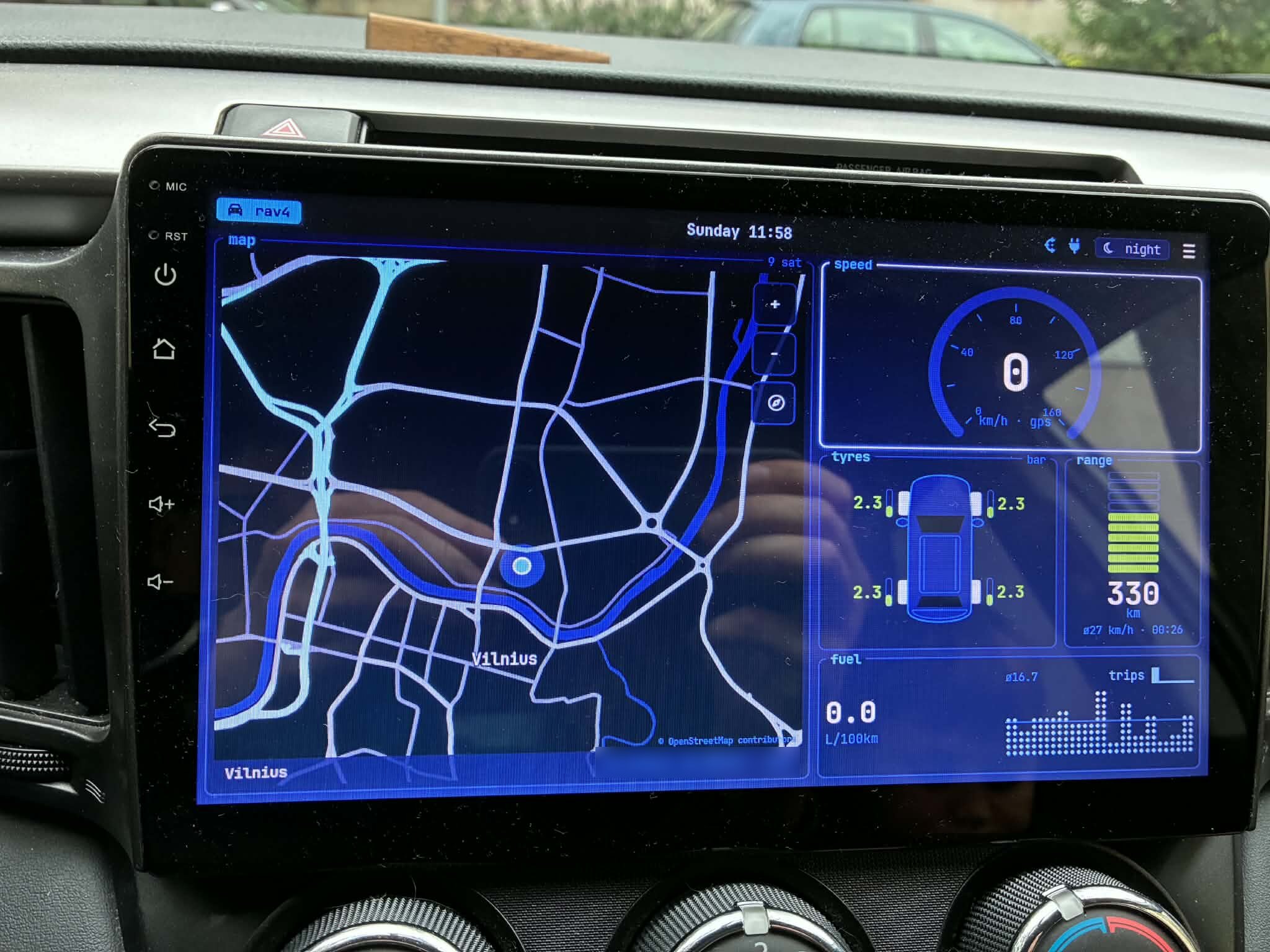
CarLauncher on the car, night theme. The GPS coordinates in the map footer are blurred. Click to enlarge.
- Omarchy look. Night mode uses Omarchy’s Lumon theme and day mode uses Flexoki Light, with colour values copied from Omarchy’s own theme files. The font is JetBrainsMono Nerd Font, whose glyphs double as the icons. Panels are btop-style boxes with the title cut into the border, and the top bar is waybar-style.
- Live car data. Tyre pressures per wheel, open doors, hood and tailgate, remaining range, and instant and per-minute fuel consumption, all decoded from the car’s CAN bus.
- Custom gauges. A 270° speed arc that eases between GPS readings, a segmented range meter that goes green, yellow, then red, a top-down SUV with a pressure bar at each tyre, and a btop-style dot graph of fuel use.
- Offline map of Lithuania. A 4.6 MB file built from OpenStreetMap data, with pinch and button zoom, heading-up or north-up modes, a full-screen mode with a compact data strip, and the nearest town in the footer. No network needed.
- Menu and app drawer. A walker-style menu that reaches every app the vendor launcher did (Radio, Bluetooth, settings and the rest), plus a grid of all installed apps.
- Day and night. Auto mode switches themes at sunrise and sunset for the current GPS position, and a chip in the top bar forces either one.
- Radio tile. A tile under the map shows what my CarRadio app is playing, FM or an internet stream, with previous, play/pause and next buttons. Tapping it opens the full radio app.
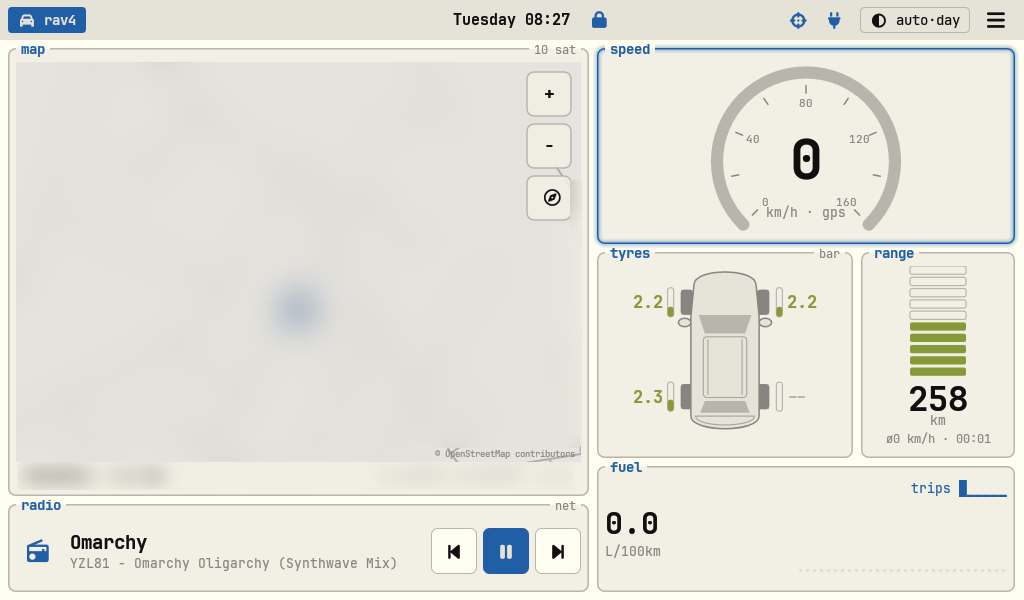
Day theme, with the radio tile playing an internet stream. The map, place name and coordinates are blurred. Click to enlarge.
Problems we had to solve
No documentation for the car data. The vendor CAN app receives raw frames from the CAN adapter as an Android broadcast. I disassembled its APK with dexdump to learn the Toyota protocol it speaks, then wrote my own decoder that listens to the same broadcast. Each field was checked against the vendor app’s own screens, and range, for example, turned out to be plain kilometres, not the scaled value I first assumed. There is no vehicle speed or RPM on this protocol, so speed comes from GPS.
Data that blinks. Different frames arrive at very different rates: range roughly every 5 seconds, tyre pressures less often, consumption history about once a minute. With a single 5-second staleness window, range kept flickering to --. Each field now has its own window, tuned from logs recorded while driving.
A map with no internet. The head unit has no reliable data connection, so the map is built offline. A Python script turns the Geofabrik OSM extract for Lithuania into a compact tiled binary with detail and overview cells and about 19,000 place names. The app memory-maps that file and renders off the UI thread into a 16-bit bitmap, so an old MediaTek chip keeps up.
Background services get killed. Android’s background limits dropped the manifest receiver for ignition-on events. The listener moved into a foreground service with a receiver registered at runtime.
Radio vs Bluetooth music. The ROM relaunches FM after every ignition-on if it was the last app opened, which cuts in over whatever Bluetooth audio was playing. Root isn’t available to app code, so the launcher first tried requesting audio focus and bringing itself to the front on ignition-on. The real fix came later: I replaced the vendor radio with my own CarRadio app and disabled the vendor FM screens, so there’s nothing left to relaunch. The tile and the menu’s Radio entry now open CarRadio.
Clipped icons. Nerd Font glyphs draw wider than their advance width, so icon-only text views cut them off, and the GPS crosshair lost its edges. A small IconView now centres each glyph by its actual ink bounds.
Testing a car app at a desk. A debug-only receiver lets adb inject raw CAN frames and switch themes, which made it possible to see low-tyre, open-door and hood warnings without doing it for real. This ROM ignores fake GPS providers, so the map was checked by driving instead.
Outcome
- It’s the daily home screen in the car. Most of it was verified while driving, with live CAN and GPS data, and with screenshots taken on the unit after each step.
- It works alongside TouchLock, my ghost-touch blocker for the same screen, and CarRadio, which it controls from the radio tile. When locked, the whole launcher looks exactly the same except for a small lock icon next to the clock.
- Still open: confirming which tyre is which against the vendor app with the engine running, and seeing heading-up and speed-based auto-zoom on a longer drive.
Stack rationale
Plain Java Android views, no frameworks. Every gauge is a custom View drawn on a canvas. It’s the lightest option for a 1024×600 screen on an Android 9 MediaTek board, and it gives full control over the look.
Reading the CAN broadcast directly. Listening to the same broadcast as the vendor app means the launcher doesn’t depend on that app’s UI, and nothing on the car side had to change.
A custom map format instead of a map SDK. Map SDKs expect a network connection or ship large tile caches. A purpose-built file for one country is under 5 MB and loads instantly.
Built with Claude Code. It planned the revamp, did the reverse engineering and wrote most of the code, verifying each step on the unit over adb while I drove.
Personal project for my own car. Map data © OpenStreetMap contributors (ODbL). Omarchy themes and the JetBrainsMono Nerd Font belong to their respective authors.