CarRadio — Replacing My Head Unit's FM App Without Root Access to Audio
Background
The stock FM app on my car’s head unit had one habit that made it worse than useless: once it had been opened, even by a ghost touch, the ROM relaunched it after every ignition-on, right over whatever Bluetooth music was playing. Disabling it fixed the music but took the radio away. Working around it from my launcher helped, but it was still a workaround.
So I replaced the radio app itself. The goal was an app that plays FM and internet radio, looks like the rest of my Omarchy-style car setup, and never starts itself.
What I built
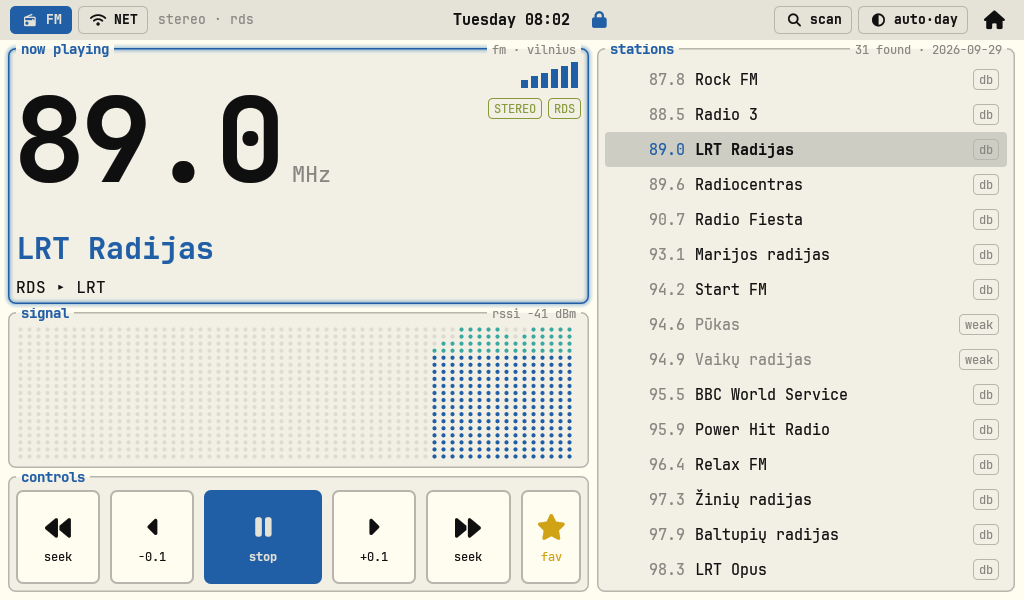
FM playing, with the RDS station name, a live signal graph and the scanned station list. Click to enlarge.
- FM. A full-band scan that finds about 30 stations in 12–20 seconds, names from a bundled Vilnius station list plus live RDS, favourites, seek, and ±0.1 MHz fine-tuning. A dot graph shows signal strength as you tune.
- RDS. Station names and RadioText (“now playing”) decoded live. Stations send it in different ways: one scrolls its name a character at a time, another sends it word by word, so the app reassembles the pieces.
- Internet radio. The same stream list as the CLIAMP player on my desktop (including Omarchy’s own station), plus Lithuanian stations’ web streams, with the current track title and a spectrum.
- Same look as the launcher. btop-style panels, JetBrainsMono Nerd Font, and the same AUTO/DAY/NIGHT theme.
- A tile on the home screen. The launcher shows a radio tile under the map with the station, the current track, and previous, play/pause and next buttons. Tapping the text opens the full app.
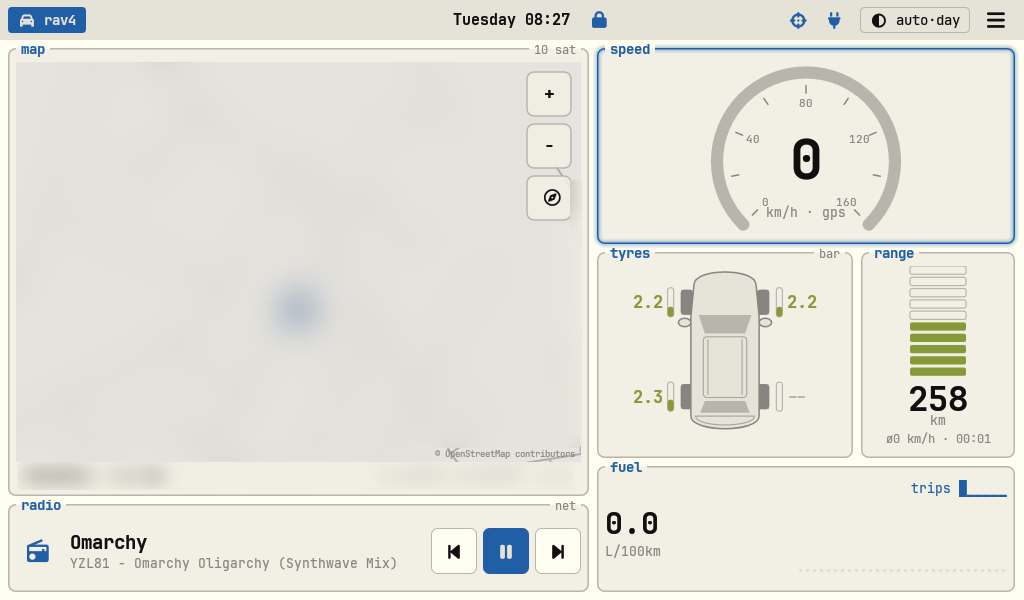
The radio tile in CarLauncher, playing an internet stream. The map, place name and coordinates are blurred. Click to enlarge.
Problems we had to solve
Driving an undocumented FM chip. The unit has a MediaTek MT6627 chip, and the only code that talks to it is the vendor’s native library. The app bundles its own copies of that library and its config library, and declares a Java class with the exact name and method signatures the library expects. Getting it to load took two unusual settings: the app has to target Android 6 (API 23), because the library links against private system libraries that newer targets can’t load, and every build has to be non-debuggable, because the library makes a JNI call that Android’s debug checks abort on.
Audio routing needs a system permission. Tuning worked quickly, but there was no sound. Routing the FM tuner to the car’s amplifier needs MODIFY_AUDIO_ROUTING, a permission ordinary apps can’t get. The fix came from the vendor’s own code: its FM package exports a test service, with no permission check, that sets up exactly that audio route. CarRadio asks that service to open the route once, then does all tuning, scanning and RDS itself. The first play after starting the app takes about 5 seconds; after that, tuning is instant.
The scan misses stations. The chip’s built-in scan is cautious and skipped at least one station that plays clearly. After the full-band scan, the app tunes to each frequency on the local station list and keeps it if the signal is strong enough. Stations that still don’t make it stay in the list, dimmed and tagged weak.
The shortcut that wiped the unit. A cleaner route was to install the app as a privileged system app, which would have granted the audio permission directly. Remounting the system partition to do that rebooted the unit and wiped all its user data, including the launcher, TouchLock and their settings. Everything was restored the same day, a recovery runbook now lists every step, and the project’s notes carry a hard rule never to try that again.
Stopping the old radio for good. After the wipe, the first ignition test failed: the old radio started. The ROM had recorded it again as the last-opened app. Clearing that setting and disabling the vendor FM screens (while keeping the test service the audio route depends on) fixed it. On the retest, Bluetooth music kept playing and nothing launched.
Talking to the launcher safely. The launcher and the radio are separate apps. The radio broadcasts its state and the launcher sends it commands, and both directions require a signature permission. Only apps signed with my key can control the radio or read what it’s playing.
Outcome
- FM, RDS, the full scan, internet streams and the steering-wheel buttons all work on the car, verified on the unit and confirmed by me in the car.
- Ignition-on no longer interrupts Bluetooth music: the old radio can’t launch, and the new one never starts on its own.
- The launcher tile shows what’s playing and controls the radio from the home screen.
Stack rationale
The vendor’s native library, not a reimplementation. The chip’s driver interface isn’t documented. Reusing the vendor’s library, and matching the class it expects, was far safer than writing raw commands to /dev/fm.
Borrowing the audio route instead of rooting the system. It keeps the system partition untouched. After what a single remount did, that matters more than the 5-second start.
Plain Java views. The same approach as the launcher: custom-drawn views for the frequency, signal graph and spectrum, no frameworks.
Built with Claude Code. It probed the chip over adb, disassembled the vendor’s bytecode to find the test service, and wrote the app, while I listened in the car and reported what I heard.
Personal project for my own car. Stream and station names belong to their respective broadcasters.